

Insights
Website conversion5 min readUpdated
Website Traffic but No Calls? What Home-Service Companies Should Fix First
Getting website traffic but no calls? See why home-service and contractor pages lose leads, what to check first, and when the issue is follow-up instead of traffic.
Diagnostic focus:
Diagnose site conversion gaps for home-service companies with existing traffic.
Helpful?
Save or share this insight with someone diagnosing the same path.
If your site is getting clicks but the phone is still quiet, the issue is usually not "more traffic." It is what happens between the click and the next action.
For home-service companies, that gap usually shows up in one of four places:
- the page does not make the next step obvious
- the site does not look trustworthy enough fast enough
- the landing page does not match the search or ad that brought the visitor there
- maps or listings imply a service footprint the page does not reinforce
- the lead path after the click is weak, slow, or unclear
That is why the right first question is not "How do we drive more visitors?" It is "Why are the current visitors failing to turn into calls?"
If your contractor website is not generating calls, check the first screen first
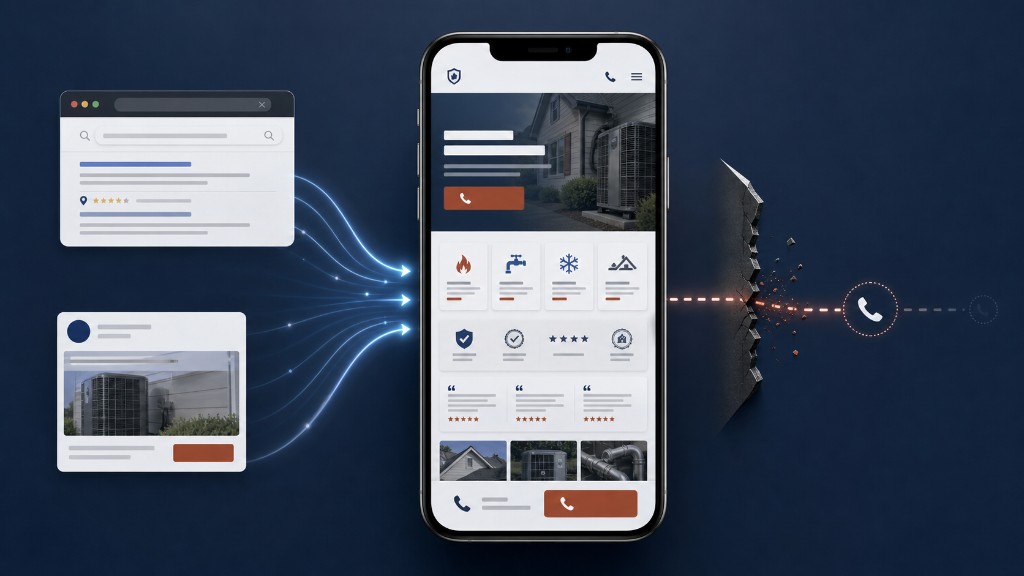
A contractor website can get traffic and still fail if the first mobile screen does not make the next step obvious. Before changing ads or buying more visitors, check whether the page quickly shows what you do, where you work, why you are credible, and how someone should call or request help.
What is usually happening
A lot of contractor sites are built like brochures.
They talk about the business. They list services. They may even look decent on desktop. But when a real buyer lands on the page from a local search or an ad, the site still asks that buyer to do too much work:
- hunt for the phone number
- guess whether you serve their area
- scroll for proof
- figure out whether you handle emergency work
- decide whether you are credible enough to call
That friction kills calls.
Home-service traffic is often high-intent traffic. People are not browsing for fun. They are trying to solve a problem, often on mobile, often quickly, and often while comparing you against two or three other companies. If the site does not reduce that decision friction fast, the click does not turn into a conversation.
HVAC, roofing, and plumbing sites usually fail in different ways
For HVAC, the problem is often urgency and service-area clarity. For roofing, it may be proof, storm context, or estimate confidence. For plumbing, emergency intent and call visibility usually matter most. The page does not need to say everything. It needs to prove the right thing fast enough for the job type. Trade playbooks: HVAC marketing agency, roofing marketing agency, and plumbing marketing agency.
The first things to check
1. Is the next step obvious in the first screen?
On mobile, a visitor should not need to hunt for the phone number, book button, or contact path.
If the top of the page makes them think instead of act, you are already losing calls.
Good first-screen behavior usually includes:
- a visible phone action
- a clear service/category label
- a visible service-area cue
- proof or trust signal close to the action
If your page opens with brand copy, a generic hero, or a long paragraph, that is usually a sign the page is carrying the wrong job.
2. Does the page match the traffic source?
If someone clicks an HVAC repair ad and lands on a broad homepage, you have made the click work too hard.
If someone searches for emergency plumbing and lands on a slow, generic service page with no emergency path, you have broken the message match.
The landing page needs to feel like the answer to the click, not just the next page after it.
3. Does the site prove enough trust quickly?
For home-service buyers, trust is not a nice extra. It is part of conversion.
People want to know:
- are you real?
- are you established?
- do you do this kind of work often?
- do you serve my kind of job?
- are you likely to call me back?
That means the page needs visible trust markers early:
- real photos or believable visuals
- clear service categories
- area/service fit
- review or proof cues
- signs of operational seriousness
If all of that shows up only far below the fold, the page is making the visitor wait too long.
4. What happens after the click?
Sometimes the page is not the only issue.
If the site generates forms but the office calls back slowly, if after-hours inquiries sit until morning, or if no one owns the next step, the website will still look like the problem even when the real bottleneck is follow-up.
This is why Flowpoint looks at the site and the lead path together. A click only matters if the business actually catches it.
What good looks like
A strong home-service page usually does four things well:
- 01It tells the visitor they are in the right place.
- 02It makes the next action obvious.
- 03It shows enough trust fast enough.
- 04It supports the handoff after the click instead of pretending the form fill is the finish line.
That is also why website and conversion work should usually be evaluated alongside lead routing and follow-up, especially for shops where the office and the field are already stretched. If leads are already coming in but still not booking, compare that against what to fix when leads do not book. For on-page structure, see what a contractor landing page actually needs.
What to do next
If your site gets traffic but not enough calls, do not start by buying more traffic.
Start by checking:
- the first mobile screen
- the click-to-page match
- the trust proof near the action
- the speed and ownership of the lead handoff
If you want a cleaner diagnosis, start with a Free Lead Audit. Flowpoint reviews the site, the traffic path, and the early handoff so you can see whether the real bottleneck is the page, the message, or what happens after the click.
Helpful?
Save or share this insight with someone diagnosing the same path.
Found this useful? Share it with someone fixing the same problem.