

Insights
Website conversion14 min readUpdated
Why Your Contractor Quote Form Is Not Converting
A practical diagnostic for contractor quote form abandonment: form friction, trust gaps, mobile issues, service-area confusion, response expectations, and follow-up routing.
Diagnostic focus:
Help home-service operators diagnose why a contractor quote form is getting views or starts but not enough completed quote requests before they blame traffic or increase ad spend.
Helpful?
Save or share this insight with someone diagnosing the same path.
When a contractor quote form is not converting, the first reaction is usually to blame traffic. The ads must be wrong. The SEO traffic must be weak. The leads must be tire-kickers.
Sometimes that is true. But a visitor can have real service intent and still abandon a quote request form that feels slow, risky, confusing, or too much like homework.
The quote form sits at an awkward handoff. Marketing has promised help. The office needs enough information to route the job. The customer wants a clear next step without inviting a sales chase they cannot control.
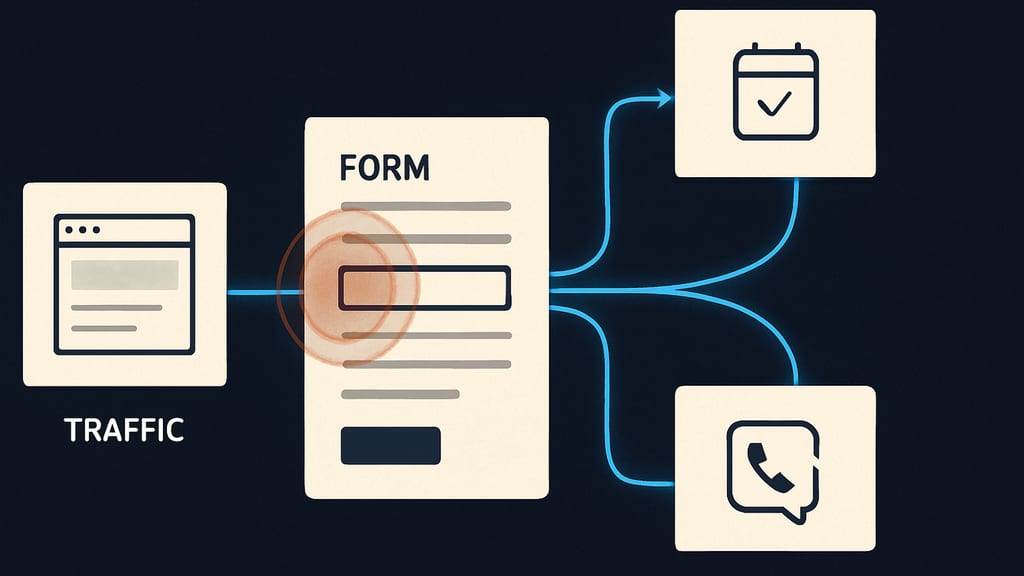
Before spending more on traffic, inspect the path between interest and submission. The leak is often visible if you look at the form, the page around it, the phone experience, and what happens after someone presses submit.
The Form May Be the Leak, Not the Traffic
A non-converting quote form does not always mean nobody wants the service. It may mean people are reaching the form, hesitating, and choosing another route. Some call instead. Some leave. Some start the form and stop when a required field asks for something they do not know yet.
That distinction matters because the fix is different. Bad traffic needs source, query, and targeting work. A weak form path needs page context, field design, trust, mobile QA, and follow-up clarity.
- Form views without submissions can mean the page created interest but the next step felt uncertain.
- Form starts without completions usually point to friction inside the form itself.
- Completed forms with poor-fit requests may mean the form is too loose or the page is attracting the wrong job types.
- Completed forms that do not become booked estimates may point to response speed, routing, qualification, or office workflow.
- A high call volume from the same pages may mean visitors prefer the phone because the form feels too slow or unclear.
The first diagnostic question is not, "Do we need more traffic?" It is, "Where are ready visitors hesitating?"
Start With the Evidence You Already Have
Do not start by debating button colors or copying a competitor's form. Start with the basic evidence. You are trying to separate a traffic problem from a conversion path problem.
- 01Compare quote form page visits to completed quote requests.
- 02Break that view-to-submit path down by device type.
- 03Check whether mobile users abandon more often than desktop users.
- 04Compare traffic sources, including paid search, organic service pages, Google Business Profile clicks, direct visits, referrals, and social if used.
- 05Look for form starts, field-level drop-offs, validation errors, and incomplete submissions if your tools capture them.
- 06Review call logs to see whether visitors call instead of submitting, especially on urgent service pages.
- 07Tie submitted forms back to booked estimates and booked jobs where your CRM, inbox, or spreadsheet allows.
If no event tracking exists, that is not a reason to guess. It is part of the problem. At minimum, you want to know how many people see the form, how many start it, how many finish it, and what happens to those requests after they arrive.
Define What "Not Converting" Actually Means
Operators often use one phrase for several different leaks. "The form is not converting" could mean low total submissions, high abandonment, poor-fit inquiries, duplicate leads, fake requests, or good requests that never turn into appointments.
- If people are not reaching the form page, inspect navigation, calls to action, page intent, and traffic quality.
- If people reach the form but do not start it, inspect trust, page copy, service fit, and the perceived cost of beginning.
- If people start but do not finish, inspect required fields, mobile behavior, validation, uploads, dropdowns, and error messages.
- If people submit but the office cannot use the request, inspect qualification fields and the surrounding page promise.
- If good submissions do not become booked work, inspect response time, ownership, routing, duplicate follow-up, and estimate scheduling.
This definition step keeps the team from fixing the wrong thing. A shorter form will not solve a missed-notification problem. Better ad targeting will not solve a broken mobile date picker.
Friction Usually Hides in the Required Fields
Most quote forms become heavy one field at a time. Nobody sets out to make the customer do office admin. But after years of adding questions for estimating, scheduling, dispatch, and sales, the quote request starts to feel like an application.
Fields that often create hesitation
- Budget fields, especially when the homeowner has no idea what the work should cost.
- File-upload requirements that are hard to complete from a phone or feel premature.
- Long project-description boxes with no guidance about what to include.
- Dropdowns that do not match the actual services the company sells.
- Address fields that do not explain whether the information is for service-area confirmation, dispatch planning, or an in-person estimate.
- Multiple contact fields when the visitor does not know whether they will get a call, text, or email.
- Required date or time fields when the company has not shown available windows.
The fix is not automatically to remove every qualification question. Some fields protect the office and the crew. A roofing replacement, a drain emergency, a remodel inquiry, and a small repair may need different information. The question is whether each required field helps route, qualify, price, schedule, or prioritize the work.
If a field is only nice to have, move it into the follow-up call or text. If it is necessary, explain why it is needed in plain language.
Mobile Problems Are Often Conversion Problems
Many contractor website leads come from people researching during a break, standing in a driveway, dealing with a repair, or comparing options from a phone. The form that looks acceptable on a desktop monitor can feel painful on mobile.
- Small tap targets make the form feel fiddly and increase errors.
- Sticky headers or chat widgets can cover fields or buttons.
- Address autocomplete can fight the user's typing or fail on real local addresses.
- CAPTCHAs can add a step that feels unrelated to getting help.
- Date pickers can break, hide the keyboard, or force too much precision too early.
- Validation errors can appear above the visible screen, leaving the visitor stuck.
- Slow-loading scripts can make the page jump while the visitor is trying to type.
- A weak confirmation message can make the customer wonder whether the request went through.
Test the form on a real phone using cellular data, not only office Wi-Fi. Submit it like a customer would. Use a real service address. Try a typo. Try a photo upload. Try backing out and returning. Watch for the small annoyances that do not show up in a conference-room review.
Trust Around the Form Matters as Much as the Form
A contractor quote form does not convert in isolation. The surrounding page tells the visitor whether the company handles their job, works in their area, seems credible, and will respond in a way that feels manageable.
- State the service type clearly near the form so the visitor does not wonder whether their job fits.
- Clarify service-area limits when location matters.
- Show truthful proof points where relevant, such as licensing, insurance, review presence, warranty language, financing availability, or trade-specific credentials.
- Explain what happens after submission: call, text, email, scheduling link, office review, or estimate coordinator follow-up.
- Give a realistic response expectation instead of implying instant service if the office cannot support it.
- Use a specific button action when possible, such as requesting a callback, requesting an estimate review, or checking availability.
- Avoid cluttering the page with badges or claims that do not help the customer decide.
Trust friction is usually quiet. The visitor does not write to tell you they were unsure who would contact them or whether you handle their neighborhood. They just choose the contractor who made the next step clearer.
Service-Area Confusion Can Stop a Good Lead
Service-area friction is common for contractors because location affects dispatch, minimum job size, travel time, crew planning, and margins. Customers know this too. If the page is vague about where you work, they may avoid the form rather than risk wasting time.
The answer is not always a giant list of every city on the page. The answer is clarity at the decision point. If the address is required, say whether it is used to confirm service availability. If certain areas have minimums, special scheduling windows, or emergency limitations, make that clear enough to reduce bad-fit submissions without scaring off good ones.
- Check whether location language appears near the form, not only in the footer.
- Make sure city and neighborhood pages do not send people into a generic form that contradicts the page they came from.
- Review dropdown service areas for missing towns, duplicate labels, or outdated locations.
- Ask the office which locations produce wasted quote requests and why.
- Use routing rules carefully if different branches, crews, or estimators cover different areas.
Do Not Lower Friction So Far That Lead Quality Collapses
It is tempting to reduce the form to name, phone, and message. That may increase submissions, but it can also increase unqualified requests, wrong service types, outside-area leads, and calls the office cannot resolve quickly.
The goal is not the most form fills. The goal is more usable quote requests from the right jobs.
- Keep fields that protect service-area fit.
- Keep fields that route emergency work differently from planned projects.
- Keep fields that prevent an estimator from driving to a job the company would never take.
- Move nice-to-have details into follow-up.
- Use conditional questions when possible so every job type is not forced through the same path.
- Measure booked estimates, booked jobs, and job fit, not only form conversion rate.
A home service lead form should qualify without making the customer feel like they are applying for permission to be helped.
The Follow-Up Promise Can Make or Break the Form
Website conversion and office operations are connected. If the visitor suspects the form goes into a black hole, they may call someone else. If past customers have learned that forms are slow but calls get answered, your data may show weak form performance even when the page is creating demand.
- Say whether the next contact will be a call, text, email, scheduling link, or office review.
- Set a response expectation the team can actually meet.
- Route submissions to a person or queue with ownership, not a shared inbox nobody checks consistently.
- Test notification delivery after website updates, CRM changes, spam-filter changes, or form plugin changes.
- Make the confirmation page obvious and useful.
- Use autoresponders to confirm receipt and explain the next step without overpromising.
- Review whether duplicate follow-up from multiple team members is confusing customers.
Missed form notifications are the digital version of missed calls. The customer asked for help, but the business did not catch the handoff.
Separate Traffic Problems From Form Problems
Traffic can still be the issue. A contractor quote form will struggle if the page is attracting job seekers, DIY researchers, wrong-service searches, outside-area visitors, or price shoppers looking for a product the company does not sell.
But do the split before you decide. Compare behavior by source, page, device, and query where available.
- 01If paid search has high form starts and low completions, inspect landing-page fit, form friction, and mobile QA before assuming the campaign is useless.
- 02If organic service pages get visits but few starts, inspect page intent, proof, calls to action, and service-area clarity.
- 03If Google Business Profile clicks often become calls instead of forms, check whether the form is necessary for that service or whether phone routing should be treated as the primary path.
- 04If referral traffic completes forms at a better rate, inspect whether those visitors arrive with more trust and less need for proof.
- 05If desktop converts but mobile does not, prioritize mobile form testing before rewriting the whole page.
This is also where lead quality matters. A source that sends fewer completed forms may still produce better booked work. A source that sends many forms may still waste the office if the job type, budget, or area is wrong.
What to Check First
If you need a practical order of operations, start with the highest-risk leaks. These are the checks that usually reveal whether the quote form is creating avoidable resistance.
- 01Submit the form from a phone on cellular data. Note slow loading, awkward fields, hidden errors, broken uploads, and unclear confirmation.
- 02Review the required fields. Mark each one as needed for routing, qualification, pricing, scheduling, or follow-up. Challenge everything else.
- 03Read the page around the form. Ask whether a homeowner can quickly tell what you do, where you work, what happens next, and why they can trust the business.
- 04Check analytics for page views, form starts, completions, device split, and traffic source split.
- 05Compare form submissions to booked estimates and booked jobs, not only raw lead count.
- 06Ask the office which fields customers struggle with and which fields the team actually uses.
- 07Test notification routing. Confirm who receives submissions, how fast they see them, and what happens if that person is out.
- 08Review call logs for pages where visitors may be choosing phone contact instead of the form.
This sequence is not complicated, but it is often skipped. Teams jump from low lead volume to higher ad spend without checking whether the current visitors are being asked to fight the form.
How to Think About Fixes
Good fixes reduce uncertainty without destroying qualification. That is the balance. You want the form to feel easy enough for a real homeowner to complete, but structured enough for the office to act on.
- Reduce effort where the field does not improve routing or qualification.
- Add explanation where a necessary field could feel invasive or confusing.
- Use conditional logic when different services require different information.
- Move detailed estimating questions later if the customer cannot reasonably answer them yet.
- Make mobile completion the standard, not an afterthought.
- Clarify the next step near the form and after submission.
- Make sure every submitted request has an accountable owner.
Avoid one-size-fits-all rules. Emergency plumbing, HVAC replacement, roofing, landscaping, remodeling, electrical service, and specialty trades do not need the same quote flow. The right form depends on urgency, job value, service area, estimate process, crew availability, and how much qualification the office needs before committing time.
A Simple Audit Before Buying More Leads
Before increasing ad budget or hiring another lead source, run a small quote-form audit. It does not require a full website rebuild. It requires looking at the handoff with the same seriousness you give to missed calls, unassigned estimates, and schedule gaps.
- 01Document the current form path on desktop and mobile.
- 02Capture the data you have: visits, starts, completions, calls, submissions, booked estimates, and booked jobs.
- 03Identify fields that create confusion without improving lead handling.
- 04Add clear next-step language near the form.
- 05Strengthen honest trust cues around service fit, service area, licensing, reviews, warranty, or financing where relevant.
- 06Fix mobile issues before making larger messaging judgments.
- 07Verify notifications, CRM routing, autoresponders, and confirmation pages.
- 08Review results after the changes before making large traffic decisions.
If the contractor quote form is not converting because the wrong people are arriving, traffic work is warranted. If ready visitors are abandoning because the next step feels unclear, the form and follow-up path need attention first.
A Humble Bottom Line
There is rarely one magic field that fixes a quote request form. The leak is usually a stack of small doubts: too many required answers, unclear service fit, weak mobile behavior, vague follow-up, or a confirmation path the office does not fully own.
Inspect those pieces before you buy more attention. More traffic only helps if the next step is clear enough for a real customer and useful enough for the team that has to turn the request into booked work.
What to do next
If this sounds familiar, audit the quote form before increasing ad spend. Test it on mobile, review start-to-submit data, compare form leads to booked work, and verify who owns follow-up.
If the page around the form is weak, read what belongs above the fold on contractor landing pages. If submissions arrive but estimates stall, read why home-service leads go cold after the form fill.
A project review is the right next step when you need an outside read on the form path, page context, tracking, and routing.
Helpful?
Save or share this insight with someone diagnosing the same path.
Found this useful? Share it with someone fixing the same problem.